The device joins your phone
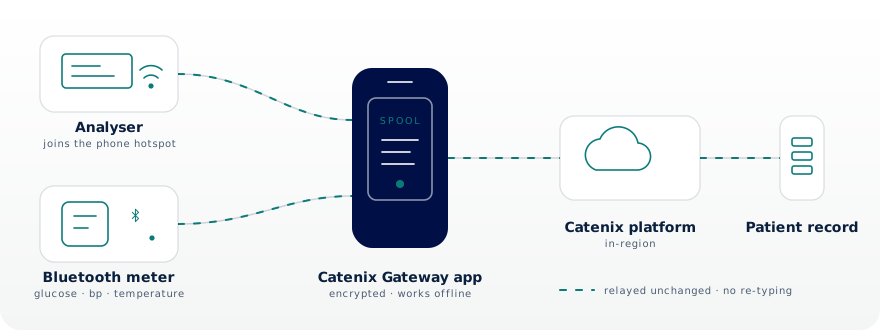
Turn on the phone's hotspot and the analyser connects to it, exactly as it would to a clinic network. Bluetooth meters pair with the phone directly.

Home / Platform / Pocket Gateway
Testing away from the clinic usually ends the same way: results sit on the analyser, get copied onto paper, and someone types them in later. The Pocket Gateway removes all of that. The analyser joins your phone, or a Bluetooth meter pairs straight with it, and the results are in the record before you have packed the bag.
What it does
Home visits, care homes, health checks at work, pop-up clinics: wherever your team tests, the phone they already carry becomes the connection between the device and the record.
Turn on the phone's hotspot and the analyser connects to it, exactly as it would to a clinic network. Bluetooth meters pair with the phone directly.
Every result is relayed exactly as the analyser reported it, into the same record and review workflow as the clinic.
No mobile coverage at the bedside? Results queue safely on the phone and upload the moment coverage returns.
A result taken in a living room lands in the same patient record, quality checks and reports as one taken at the bench.
Each enrolled phone appears in your device fleet with its own identity, heartbeat and audit trail.
Revoke a phone from the portal and its gateway access ends within seconds. Nothing clinical is left behind on it.
Two ways in
Near-patient kit splits roughly down the middle. Bench-style analysers talk over a network; handheld meters talk over Bluetooth. The Pocket Gateway accepts both, so a visiting team carries one way of working instead of two.
Over the hotspot
Turn on the phone's hotspot and the analyser joins it exactly as it would join clinic Wi-Fi, speaking the same standards it already speaks. Nothing is reconfigured at the analyser and nothing is installed at the visit.
Over Bluetooth
Bluetooth meters send to the phone directly, with no hotspot and no cable. Put the meter in pairing mode, take the reading, and it goes to the record: blood glucose, blood pressure with pulse, and body temperature.
Bluetooth support follows the standard health-device profiles, so a meter that publishes its readings the standard way is understood without anything written specially for it. Tell us what your teams carry and we will confirm your kit before you commit.
A visit, start to finish
Why it matters
Published studies of point-of-care results entered by hand report error rates around one in every twenty-seven entries, with a share of those far enough out to matter clinically. Community and home-visit services carry the highest transcription burden of all, because the analyser has traditionally had nothing to connect to. The Pocket Gateway gives it something: the phone already in the room.
The Pocket Gateway is a per-clinic add-on. It is off until you enable it, and off again the moment you say so.
Only your signed-in team members can enrol a phone, and every enrolment is tied to a named person in the audit trail.
A phone enrolled by your clinic can only ever deliver results into your clinic. Tenancy is enforced on every upload.
Scope & intended use
The Pocket Gateway transmits readings already produced by the connected device, without change. It performs no interpretation, no calculation and no flagging of its own, and the analyser or meter keeps its own display and controls throughout. Clinical review happens where it always has: with your clinicians, in the platform.
Questions, answered
Any analyser that sends results over a network connection using the standard clinic protocols can point at the phone instead of a clinic data manager. Analysers that only connect by fixed cable or docking station stay on the clinic's edge gateway; tell us what you carry and we will confirm your kit before you commit.
Meters that report over Bluetooth Low Energy using the standard health-device profiles: blood glucose, blood pressure (which also carries pulse) and body temperature. The meter pairs with the phone directly, with no hotspot involved. The phone reads what the meter publishes and passes it on unchanged, so there is no per-brand app to open and nothing to type in.
The visit carries on. Results are acknowledged and stored on the phone, and upload automatically as soon as coverage returns. Duplicate protection on the platform side means a retried upload can never create a second copy of a result.
Just the analyser you already carry and a phone with the Catenix Gateway app. There is no laptop, no router, no dongle and nothing to install at the visit location.
iPhone today, with the app open during the testing session. Android follows, including sessions that keep running with the phone locked in a pocket.
Revoke the phone from the portal and its gateway access ends within seconds. Queued results on the phone are stored in the app's protected storage and cannot be delivered anywhere except your clinic.
Book a demo
We'll run a live session with you: enrol a phone, connect an analyser over the hotspot, pair a Bluetooth meter, lose signal on purpose, and watch the results arrive anyway.