
Home / Resources / Managing POCT across multiple sites

Buyer's guide · POCT coordination

Every site, every device, one view.

How a POCT coordinator covering several locations gets one central view of devices, operators and QC, and stops gathering evidence by car.

Published 1 July 2026 · Last reviewed: July 2026 · 5 min read

One person is usually responsible for point-of-care testing across every location: the POCT coordinator or lab manager. The testing happens at the sites; the accountability lands on their desk. Multi-site POCT management software exists to close that gap: one central view of every site, device, operator and QC record, without a site visit.

The problem: responsibility without visibility

If you coordinate POCT across several sites, this will be familiar:

  • QC status per site is unknown. You find out a control failed, or was never run, when you next visit or when someone remembers to email. Between visits, you are accountable for quality you cannot see.
  • Devices are unaccounted for. The asset list says one thing, the benches say another. Meters move between rooms and sites, and nobody tells the list.
  • Operator records drift. Someone at a satellite site has been testing for months on lapsed training, and the spreadsheet that should have caught it lives on a shared drive nobody opens.
  • Inspection evidence takes weeks. An inspection is announced and evidence-gathering becomes the job: chasing QC logs, training records and device histories out of each site, one email and one visit at a time.
  • Every site does it slightly differently. Different logs, different habits, different gaps. The only unifying layer is you.

The promise: the whole service on one screen

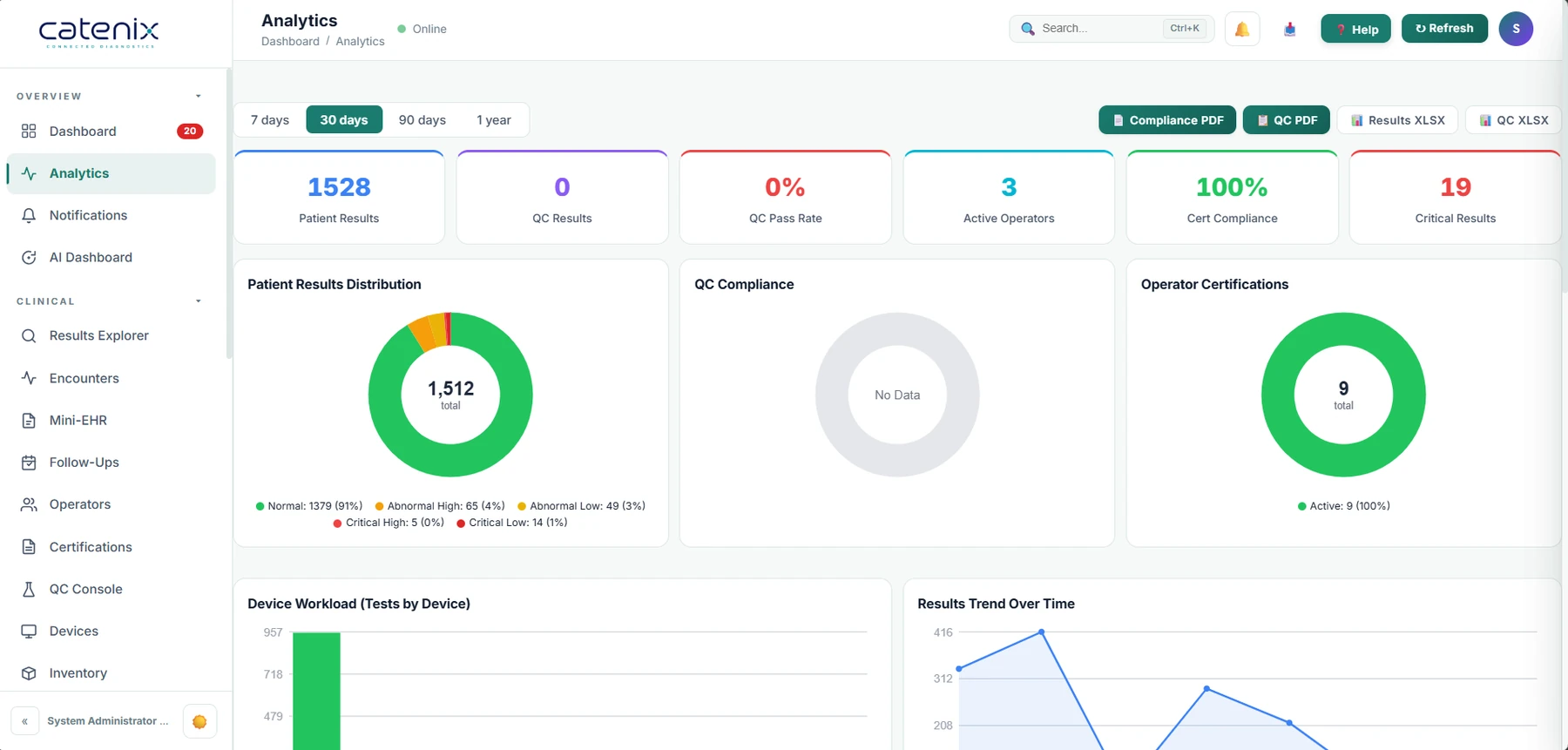
With every site on one platform, the coordinator's day changes. The morning starts with a dashboard, not a phone round: which devices reported overnight, which sites have QC due or failing, which operators are approaching renewal. A question from a clinical lead about a result at another site is answered by searching the record, not by ringing the site. And when an inspection is announced, the evidence already exists, accumulated automatically as the service ran, and is produced per site in minutes. The role shifts from gathering information to acting on it.

portal.catenix.com
Catenix analytics view: patient results, QC compliance, operator certifications, device workload and result trends

The proof

What makes it work.

Multi-site administration

Sites are first-class objects in the platform, not naming conventions. Each has its own devices, operators and settings, administered centrally through the administration layer. Adding a site is configuration, not a project.
Role-based access

Site staff work within their own site. The coordinator and quality leads see across all of them. Nobody sees data they have no business with.

Per-site QC dashboards

QC results come off connected analysers electronically and are charted as they are run: due or overdue, passing or failing, with review records attached. The quality layer covers the QC workflow in full.

Fleet status

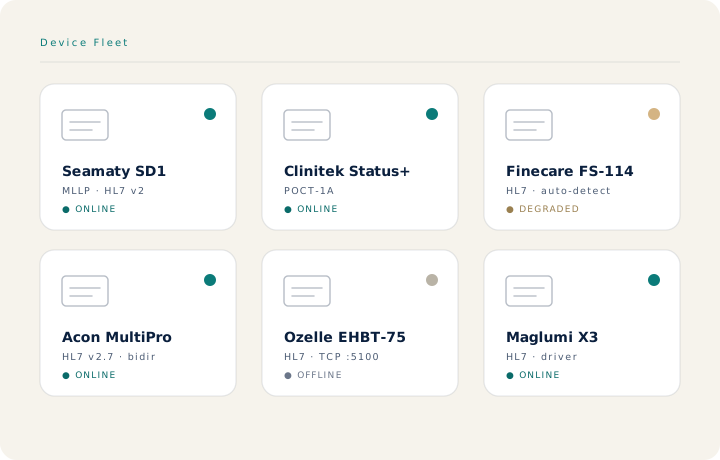
Every connected device reports in, so the asset list and reality converge. A silent device is a question you ask on the day, not a discovery you make at audit.

A full audit trail

Every result is traceable to operator, device, site and time, with the original device message retained. Inspection preparation turns from weeks of gathering into minutes of exporting. For NHS settings, see our NHS POCT page.

Process control, not interpretation

QC charting is statistical process control on control materials. Interpretation of patient results stays with the clinician and the analyser's instructions for use.

The fleet

Every device, accounted for.

Diagram of a device fleet connected through an edge gateway to the platform

Questions to ask a vendor

  1. Can you show all of our sites, live, on one screen: devices, operators and QC status?
  2. How is access scoped, and can a site user ever see another site's data?
  3. Where does QC data come from: the device itself, or someone typing it in?
  4. How long would it take to produce a full evidence pack for one site, for the last twelve months?
  5. What does adding a new site involve, and what does it cost?

← Back to resources

Questions, answered

The questions coordinators ask first.

What does multi-site POCT management software do?

It gives a POCT coordinator or lab manager one central view of every site: which devices are connected and reporting, which operators are trained and current at each location, the QC status of every device, and a searchable record of every result. Instead of visiting sites or chasing emails, the coordinator sees the whole service from one screen.

How does it help with inspections and audits?

The evidence inspectors ask for, QC records, operator records, device histories and result traceability, accumulates automatically as the service runs. When an inspection is announced, the records already exist per site and can be produced in minutes rather than assembled over weeks.

Can each site see only its own data?

Yes. Role-based access scopes what each person sees: site staff work within their own site, while the coordinator and quality leads see across all of them. Everyone works in the same system without seeing data they have no business with.

Does the coordinator have to be on site to check QC?

No. QC results come off connected analysers electronically and appear on per-site dashboards as they are run, with charts and review records attached. The coordinator can check every site's QC status from one place, on any working day, not just on visit days.

See all your sites on one screen.

Bring your site list and device fleet. We'll show the coordinator's view, live.